
How to Add a Squarespace Extension to a Product Page for Free
Adding a POWR app to your Squarespace product page is a great way to enhance your customers’ shopping experience — whether you want to display a contact form, an FAQ section, a countdown timer or any other interactive element right where your customers are making purchasing decisions. The good news is that getting started with POWR on Squarespace is completely free, and the installation process is more straightforward than you might expect. In this article we’ll walk you through exactly how to add a POWR app to your Squarespace product page step by step, so you can start enhancing your store without spending a penny.
Steps to Add a Squarespace Extension
Login to your Squarespace account
Click on Edit in the Squarespace Editor
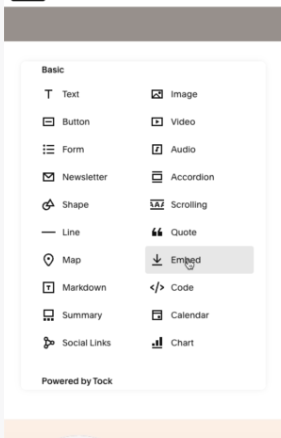
Find the right section, click on 'Add Block' and select 'Embed'
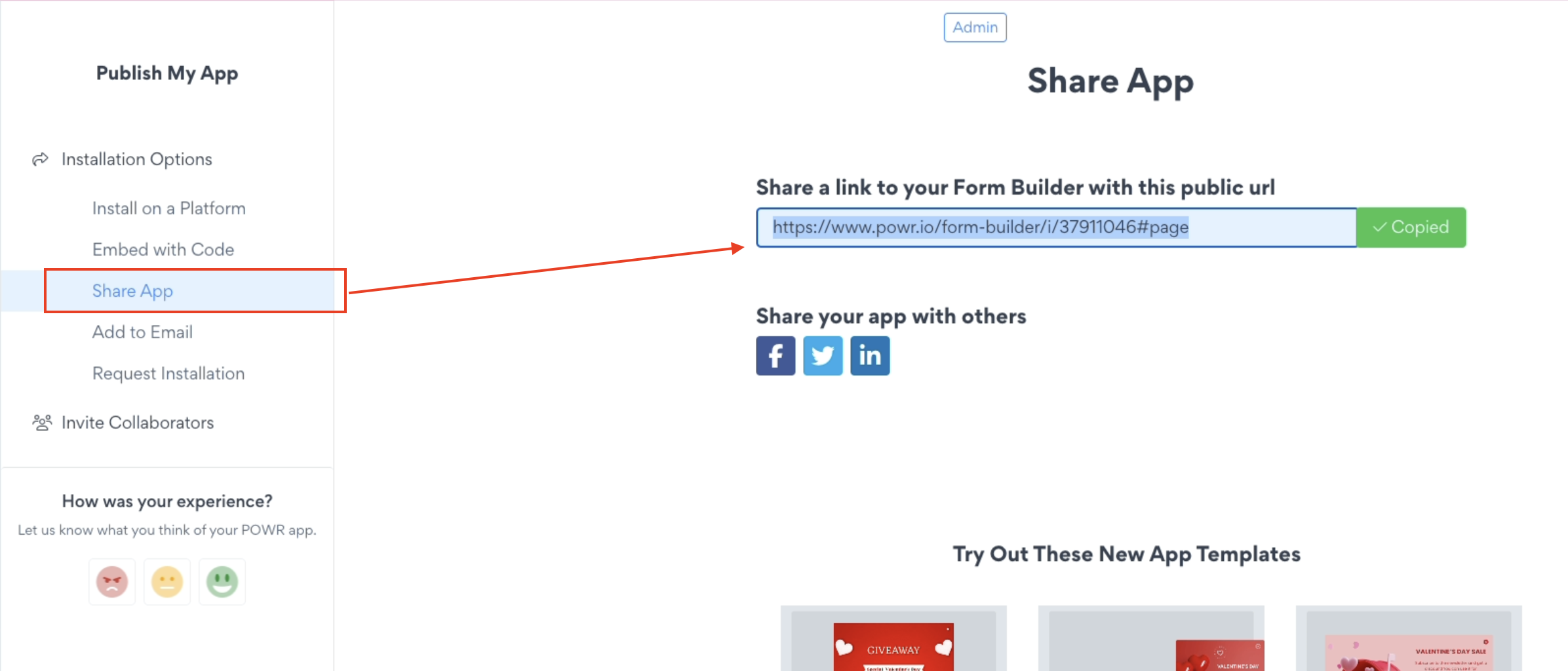
Copy the auto-generated link from your POWR app.
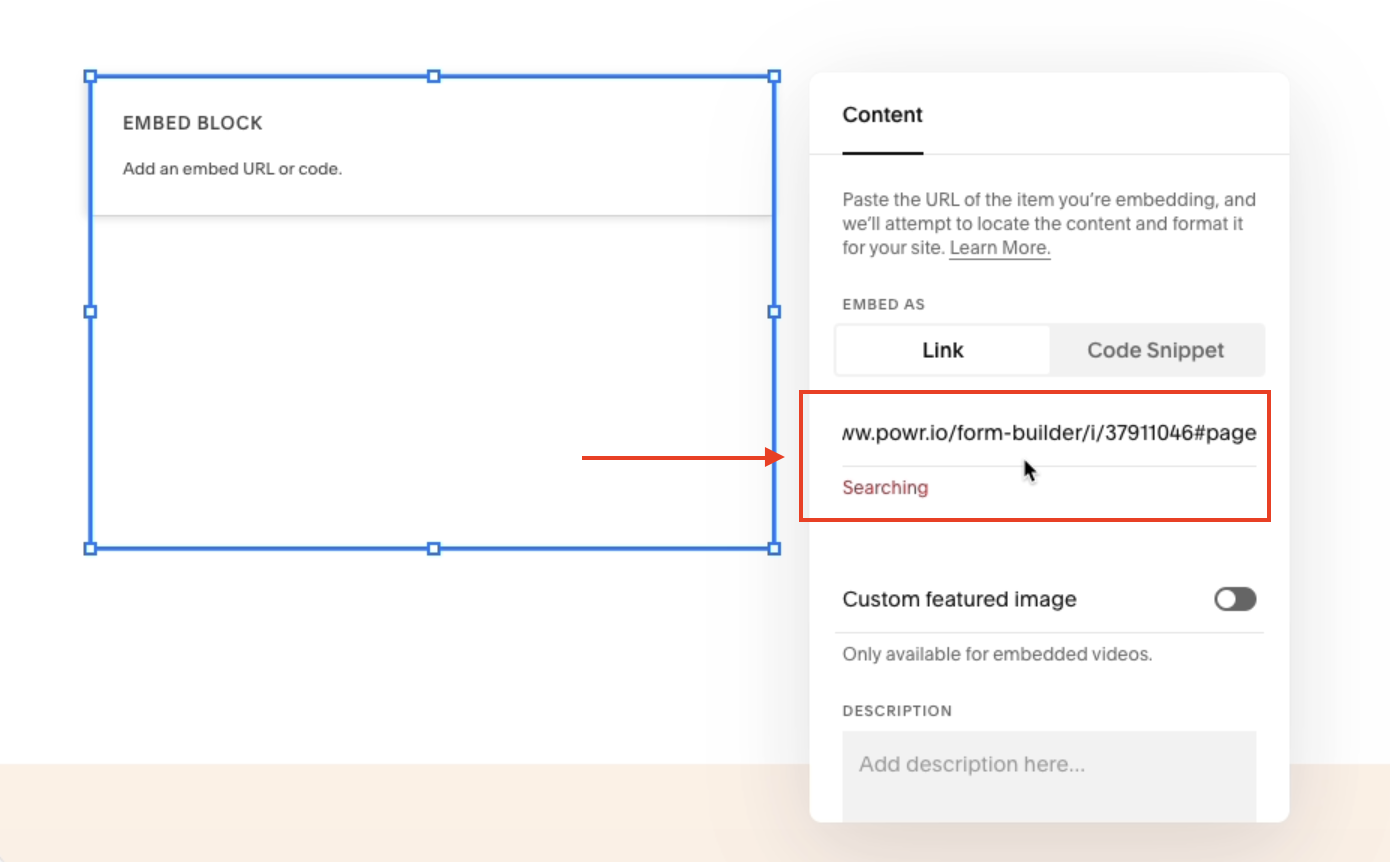
In the Embed Block, select Link and paste.
Save changes.
Follow these easy steps, and in just a few minutes, you'll have your app visible on your Squarespace product page. That's it. Below are more details and screenshots to guide you.
1. Log in to Squarespace
Log in to your Squarespace account and navigate to the website where you wish to embed the POWR app.
2. Click on Edit in the Squarespace Editor
Click on "Edit" to access the Squarespace Editor.
3. Add Embed Block
In the Squarespace Editor, find the section on your product page where you would like to add the POWR app.
Click on 'Add Block' and select 'Embed' from the options provided.
4. Get the POWR app link
Go back to the POWR Editor and click 'Publish.' Then, on the left sidebar menu, click 'Share App.' Copy the auto-generated link.
5. Paste the link
Return to the Squarespace Editor, and in the Embed Block, choose Link, and paste the copied POWR app link.
6. Save changes
Once you've added the POWR app link, click "Save" to update your Squarespace product page.
The POWR app is now live and visible on your Squarespace product page, allowing you to engage your visitors with its interactive features without the need for Squarespace code injection.
For more on using Squarespace more efficiently, here are a couple of short articles for you to check out:
Simple Guide for Using Squarespace Extensions
6 Different Ways to Connect Squarespace and Mailchimp
Adding a POWR app to your Squarespace product page is a simple and cost-effective way to make your store more engaging and functional — and the best part is you can get started for free. Once embedded your app will display seamlessly on your product page and any updates you make in the POWR editor will automatically reflect on your live site. If you run into any trouble during the installation or have any questions along the way, our support team is always here and happy to help — don’t hesitate to reach out!
Need Help?
If you need any help or have any questions about our POWR app, our support team is happy to help.
👉 Contact our support team
When contacting us, you'll be prompted to authenticate your email by signing in, and a confirmation code will be emailed to you. This helps ensure our support team's reply will be delivered to you with no issues.
For more information about available features, visit our Pricing Page:
https://www.powr.io/pricing