
I can't log into my POWR account
Can't Log In to Your POWR Account? Here's How to Fix It
Having trouble logging in to your POWR account? Whether you've forgotten your password, are using a different email address, or your account has been deactivated, we're here to help you regain access.
This guide explains how to sign in to your POWR dashboard, troubleshoot common login problems, and get help if your account has been restricted.
How to Log In to Your POWR Account
If you forgot your POWR account password or are simply trying to access your POWR apps and account settings directly from the POWR dashboard:
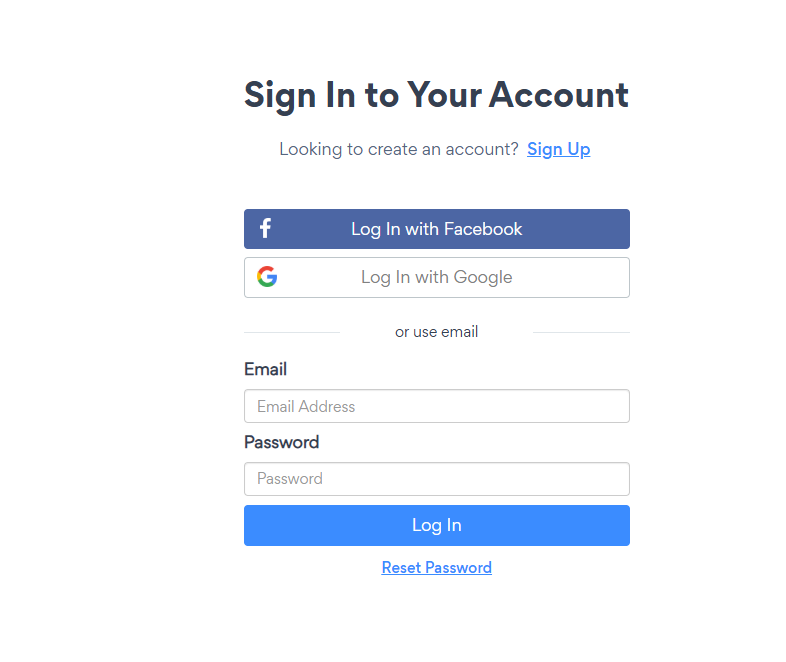
Go to powr.io/signin
Choose your preferred login method:
Continue with Google: Sign in using the Google account associated with your POWR account.
Email & password: Enter your registered email address, and a login link will be emailed to your inbox.
Reset password: If don't remember the password, you can click that button and it will send a password reset link to your email address.
Once authenticated, you'll be redirected to your POWR dashboard.
Tip: Make sure you're using the same email address associated with your existing POWR apps and subscriptions.
Not receiving the password reset email?
Try these troubleshooting steps:
Check your spam and promotions folders.
Confirm that you entered the correct email address.
Try logging in using Google instead.
Wait a few minutes and try requesting another login link.
Note: If you're still unable to login or didn't receive the login link, please contact POWR Support and we'll reset the access manually for you.
Common Reasons You Can't Log In
Several issues can prevent you from accessing your POWR account.
1. Your account was deactivated for security reasons
POWR uses automated security measures to help protect users and their customers. In certain situations, your account and Form Builder app may be deactivated if our security system detects fields requesting restricted sensitive information.
In that case, you will see an error screen when trying to use your form and/or the form will be deleted from your editor and website.
If this happens, no need to worry. Please reach out to our support team, they'll review the account, remove any fields with sensitive information and recover both the app and account.
For more details, please refer to this article about why your POWR account might be deactivated.
Note: if an account was deactivated more than twice due to sensitive fields requested on the Form Builder, you may not qualify for another recovery.
2. You're using the wrong email address
Your POWR apps and subscriptions are associated with a dedicated account email address. If you installed our apps from the Shopify app store, the email address tied to your POWR account will be the same as your Shopify store. Same thing applies to other platforms such as Wix, BigCommerce, and more.
We highly recommend to use an active email address to ensure easy access in case of login issues.
3. Your browser is preventing you from logging in
Sometimes browser settings, cached data, or extensions can interfere with the login process.
How to fix it:
Clear your browser cache and cookies, and refresh the login page.
Log into dashboard.powr.io
Try another browser, such as Chrome, Firefox, Safari, Edge, or use incognito mode
Temporarily disable browser extensions that may interfere with authentication.
If login works in a private window but not your regular browser, the issue may be related to cached data, cookies, or browser extensions.
For additional guidance, visit our Basic Troubleshooting Steps.
Frequently Asked Questions
Can I log in to POWR using Google?
Yes. Visit dashboard.powr.io and select Continue with Google. Be sure to use the Google account associated with your POWR account.
Can I reset my password if I registered with Google?
If you use Google to sign in, your Google password is managed through your Google account. Use Google's account recovery options if you cannot access it.
Why can't I see my apps after logging in?
You may be signed in to a different POWR account, or simply don't have full access from the account's owner. In the latter case, you may ask them to add you as collaborator to the apps on their POWR account.
Will resetting my password reactivate a deactivated account?
No. Resetting your password only changes your login credentials.
If your account was deactivated for security reasons, our support team must review the restriction before access can be restored.
Still Need Help?
If you've followed the troubleshooting steps above and still can't access your account, our support team is ready to assist.
In order to send your query, you will be required to authenticate your email address in order for us to ensure the deliverability of our response to you.